
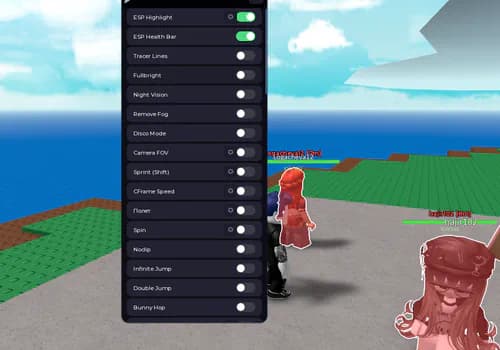
Natural Disaster Survival Darbey Script - Fly, Noclip
Boost your Roblox experience with DarbeyV14_sdsd:, instant respawn, speed boost, and more! 🚀🔥 **Features:** - Instant Respawn ⏱️ - Speed Boost ⚡ - Health Regen ❤️ - Teleport 🌀 - Custom Skins 🎨 - Weapon Upgrade 🔫 - Game Mode Switch 🎮 и много всего
Natural Disaster SurvivalExplore more Natural Disaster SurvivalDescription
Boost your Roblox experience with DarbeyV14_sdsd:, instant respawn, speed boost, and more! 🚀🔥
Features:
- Instant Respawn ⏱️
- Speed Boost ⚡
- Health Regen ❤️
- Teleport 🌀
- Custom Skins 🎨
- Weapon Upgrade 🔫
- Game Mode Switch 🎮
и много всего
Features
Boost your Roblox experience with DarbeyV14_sdsd:, instant respawn, speed boost, and more! 🚀🔥
Features:
- Instant Respawn ⏱️
- Speed Boost ⚡
- Health Regen ❤️
- Teleport 🌀
- Custom Skins 🎨
- Weapon Upgrade 🔫
- Game Mode Switch 🎮
и много всего
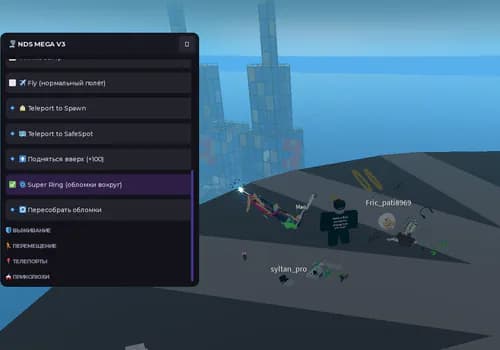
Fly
Noclip
Teleport
--========================================================--
--              MODERN FLY / TORNADO / DINO
--                 ONE LOCAL SCRIPT
--========================================================--

local Players = game:GetService("Players")
local UIS = game:GetService("UserInputService")
local RunService = game:GetService("RunService")
local TweenService = game:GetService("TweenService")
local Lighting = game:GetService("Lighting")

local player = Players.LocalPlayer
local playerGui = player:WaitForChild("PlayerGui")

--========================================================--
-- SETTINGS
--========================================================--

local MIN_SPEED = 20
local MAX_SPEED = 180

local speed = 60
local fly = false
local tornado = false
local dinosaur = false

local character
local humanoid
local root

local velocity
local gyro

local currentVelocity = Vector3.zero
local targetVelocity = Vector3.zero

local flyConnection
local effectConnection

--========================================================--
-- CHARACTER
--========================================================--

local function loadCharacter()
	character = player.Character or player.CharacterAdded:Wait()

	humanoid = character:WaitForChild("Humanoid")
	root = character:WaitForChild("HumanoidRootPart")
end

loadCharacter()

--========================================================--
-- REMOVE OLD GUI
--========================================================--

local old = playerGui:FindFirstChild("ModernFlyMenu")

if old then
	old:Destroy()
end

--========================================================--
-- GUI
--========================================================--

local gui = Instance.new("ScreenGui")
gui.Name = "ModernFlyMenu"
gui.ResetOnSpawn = false
gui.IgnoreGuiInset = true
gui.Parent = playerGui

--========================================================--
-- MAIN
--========================================================--

local main = Instance.new("Frame")

main.Name = "Main"
main.Size = UDim2.fromOffset(430, 510)
main.Position = UDim2.fromScale(0.5, 0.5)
main.AnchorPoint = Vector2.new(0.5, 0.5)

main.BackgroundColor3 = Color3.fromRGB(13, 16, 25)
main.BorderSizePixel = 0

main.Parent = gui

local mainCorner = Instance.new("UICorner")
mainCorner.CornerRadius = UDim.new(0, 22)
mainCorner.Parent = main

local outline = Instance.new("UIStroke")
outline.Color = Color3.fromRGB(90, 120, 255)
outline.Thickness = 2
outline.Transparency = 0.25
outline.Parent = main

--========================================================--
-- GRADIENT
--========================================================--

local gradient = Instance.new("UIGradient")
gradient.Rotation = 45
gradient.Color = ColorSequence.new({
	ColorSequenceKeypoint.new(0, Color3.fromRGB(18, 23, 40)),
	ColorSequenceKeypoint.new(1, Color3.fromRGB(10, 13, 22))
})
gradient.Parent = main

--========================================================--
-- HEADER
--========================================================--

local header = Instance.new("TextLabel")

header.Size = UDim2.new(1, -40, 0, 45)
header.Position = UDim2.fromOffset(20, 15)

header.BackgroundTransparency = 1
header.Text = "FLIGHT CONTROL"
header.TextColor3 = Color3.fromRGB(245, 247, 255)

header.TextSize = 25
header.Font = Enum.Font.GothamBold
header.TextXAlignment = Enum.TextXAlignment.Left

header.Parent = main

local subtitle = Instance.new("TextLabel")

subtitle.Size = UDim2.new(1, -40, 0, 25)
subtitle.Position = UDim2.fromOffset(20, 52)

subtitle.BackgroundTransparency = 1
subtitle.Text = "Advanced movement system"
subtitle.TextColor3 = Color3.fromRGB(130, 140, 165)

subtitle.TextSize = 12
subtitle.Font = Enum.Font.Gotham
subtitle.TextXAlignment = Enum.TextXAlignment.Left

subtitle.Parent = main

--========================================================--
-- STATUS
--========================================================--

local status = Instance.new("TextLabel")

status.Size = UDim2.new(1, -40, 0, 50)
status.Position = UDim2.fromOffset(20, 85)

status.BackgroundColor3 = Color3.fromRGB(24, 29, 43)
status.BorderSizePixel = 0

status.Text = "●  FLY OFF"
status.TextColor3 = Color3.fromRGB(255, 90, 105)

status.TextSize = 18
status.Font = Enum.Font.GothamBold

status.Parent = main

local statusCorner = Instance.new("UICorner")
statusCorner.CornerRadius = UDim.new(0, 14)
statusCorner.Parent = status

--========================================================--
-- BUTTON CREATOR
--========================================================--

local function createButton(name, text, position, size)

	local button = Instance.new("TextButton")

	button.Name = name
	button.Text = text

	button.Size = size
	button.Position = position

	button.BackgroundColor3 = Color3.fromRGB(32, 39, 58)
	button.BorderSizePixel = 0

	button.TextColor3 = Color3.fromRGB(235, 238, 250)

	button.TextSize = 17
	button.Font = Enum.Font.GothamBold

	button.AutoButtonColor = false

	button.Parent = main

	local corner = Instance.new("UICorner")
	corner.CornerRadius = UDim.new(0, 14)
	corner.Parent = button

	local stroke = Instance.new("UIStroke")
	stroke.Color = Color3.fromRGB(65, 75, 105)
	stroke.Transparency = 0.5
	stroke.Parent = button

	button.MouseEnter:Connect(function()

		TweenService:Create(
			button,
			TweenInfo.new(0.15),
			{
				BackgroundColor3 = Color3.fromRGB(45, 55, 82)
			}
		):Play()

	end)

	button.MouseLeave:Connect(function()

		TweenService:Create(
			button,
			TweenInfo.new(0.15),
			{
				BackgroundColor3 = Color3.fromRGB(32, 39, 58)
			}
		):Play()

	end)

	return button
end

--========================================================--
-- FLY BUTTON
--========================================================--

local flyButton = createButton(
	"FlyButton",
	"✈  FLY  OFF",
	UDim2.fromOffset(20, 150),
	UDim2.new(1, -40, 0, 62)
)

--========================================================--
-- SPEED
--========================================================--

local speedTitle = Instance.new("TextLabel")

speedTitle.Size = UDim2.new(1, -40, 0, 30)
speedTitle.Position = UDim2.fromOffset(20, 225)

speedTitle.BackgroundTransparency = 1

speedTitle.Text = "FLIGHT SPEED: 60"
speedTitle.TextColor3 = Color3.fromRGB(220, 225, 240)

speedTitle.TextSize = 15
speedTitle.Font = Enum.Font.GothamBold
speedTitle.TextXAlignment = Enum.TextXAlignment.Left

speedTitle.Parent = main

--========================================================--
-- SLIDER
--========================================================--

local slider = Instance.new("Frame")

slider.Size = UDim2.new(1, -40, 0, 12)
slider.Position = UDim2.fromOffset(20, 260)

slider.BackgroundColor3 = Color3.fromRGB(35, 41, 58)
slider.BorderSizePixel = 0

slider.Parent = main

local sliderCorner = Instance.new("UICorner")
sliderCorner.CornerRadius = UDim.new(1, 0)
sliderCorner.Parent = slider

local fill = Instance.new("Frame")

fill.Size = UDim2.new(
	(speed - MIN_SPEED) / (MAX_SPEED - MIN_SPEED),
	0,
	1,
	0
)

fill.BackgroundColor3 = Color3.fromRGB(90, 125, 255)
fill.BorderSizePixel = 0

fill.Parent = slider

local fillCorner = Instance.new("UICorner")
fillCorner.CornerRadius = UDim.new(1, 0)
fillCorner.Parent = fill

local knob = Instance.new("Frame")

knob.Size = UDim2.fromOffset(22, 22)

knob.AnchorPoint = Vector2.new(0.5, 0.5)

knob.Position = UDim2.new(
	(speed - MIN_SPEED) / (MAX_SPEED - MIN_SPEED),
	0,
	0.5,
	0
)

knob.BackgroundColor3 = Color3.fromRGB(255,255,255)
knob.BorderSizePixel = 0

knob.Parent = slider

local knobCorner = Instance.new("UICorner")
knobCorner.CornerRadius = UDim.new(1,0)
knobCorner.Parent = knob

local dragging = false

local function setSpeed(value)

	speed = math.clamp(
		math.floor(value + 0.5),
		MIN_SPEED,
		MAX_SPEED
	)

	local percent =
		(speed - MIN_SPEED) /
		(MAX_SPEED - MIN_SPEED)

	fill.Size = UDim2.new(percent,0,1,0)

	knob.Position =
		UDim2.new(percent,0,0.5,0)

	speedTitle.Text =
		"FLIGHT SPEED: " .. speed
end

slider.InputBegan:Connect(function(input)

	if input.UserInputType == Enum.UserInputType.MouseButton1 then

		dragging = true

	end

end)

UIS.InputChanged:Connect(function(input)

	if dragging and
		input.UserInputType == Enum.UserInputType.MouseMovement then

		local percent =
			(input.Position.X - slider.AbsolutePosition.X) /
			slider.AbsoluteSize.X

		percent = math.clamp(percent,0,1)

		setSpeed(
			MIN_SPEED +
			percent * (MAX_SPEED - MIN_SPEED)
		)

	end

end)

UIS.InputEnded:Connect(function(input)

	if input.UserInputType == Enum.UserInputType.MouseButton1 then
		dragging = false
	end

end)

--========================================================--
-- PRESETS
--========================================================--

local presetData = {
	{"SLOW",30},
	{"NORMAL",60},
	{"FAST",100},
	{"HYPER",180}
}

for i,data in ipairs(presetData) do

	local button = createButton(
		"Preset"..i,
		data[1],
		UDim2.fromOffset(
			20 + (i-1)*96,
			285
		),
		UDim2.fromOffset(88,38)
	)

	button.TextSize = 11

	button.MouseButton1Click:Connect(function()
		setSpeed(data[2])
	end)

end

--========================================================--
-- TORNADO
--========================================================--

local tornadoButton = createButton(
	"TornadoButton",
	"🌪  TORNADO  OFF",
	UDim2.fromOffset(20,335),
	UDim2.new(1,-40,0,52)
)

--========================================================--
-- DINOSAUR
--========================================================--

local dinoButton = createButton(
	"DinosaurButton",
	"🦖  BECOME DINOSAUR",
	UDim2.fromOffset(20,395),
	UDim2.new(1,-40,0,52)
)

--========================================================--
-- DRAGGING MENU
--========================================================--

local draggingMenu = false
local dragStart
local startPosition

header.InputBegan:Connect(function(input)

	if input.UserInputType ==
		Enum.UserInputType.MouseButton1 then

		draggingMenu = true

		dragStart = input.Position
		startPosition = main.Position

	end

end)

UIS.InputChanged:Connect(function(input)

	if not draggingMenu then
		return
	end

	if input.UserInputType ~=
		Enum.UserInputType.MouseMovement then
		return
	end

	local delta =
		input.Position - dragStart

	main.Position =
		UDim2.new(
			startPosition.X.Scale,
			startPosition.X.Offset + delta.X,

			startPosition.Y.Scale,
			startPosition.Y.Offset + delta.Y
		)

end)

UIS.InputEnded:Connect(function(input)

	if input.UserInputType ==
		Enum.UserInputType.MouseButton1 then

		draggingMenu = false

	end

end)

--========================================================--
-- FLY START
--========================================================--

local function startFly()

	if fly then
		return
	end

	loadCharacter()

	if not humanoid or
		humanoid.Health <= 0 then
		return
	end

	fly = true

	humanoid.AutoRotate = false

	velocity = Instance.new("BodyVelocity")

	velocity.Name = "ModernFlyVelocity"

	velocity.MaxForce =
		Vector3.new(
			1000000,
			1000000,
			1000000
		)

	velocity.P = 15000
	velocity.Velocity = Vector3.zero

	velocity.Parent = root

	gyro = Instance.new("BodyGyro")

	gyro.Name = "ModernFlyGyro"

	gyro.MaxTorque =
		Vector3.new(
			1000000,
			1000000,
			1000000
		)

	gyro.P = 18000
	gyro.D = 1200

	gyro.CFrame = root.CFrame

	gyro.Parent = root

	currentVelocity = Vector3.zero

	status.Text = "●  FLY ON"
	status.TextColor3 =
		Color3.fromRGB(80,255,160)

	flyButton.Text = "✈  FLY  ON"

	flyButton.BackgroundColor3 =
		Color3.fromRGB(40,150,95)

	-- Takeoff animation

	local startCFrame = root.CFrame

	root.CFrame =
		startCFrame +
		Vector3.new(0,2,0)

	TweenService:Create(
		root,
		TweenInfo.new(
			0.35,
			Enum.EasingStyle.Quad,
			Enum.EasingDirection.Out
		),
		{
			CFrame =
				startCFrame +
				Vector3.new(0,5,0)
		}
	):Play()

end

--========================================================--
-- FLY STOP
--========================================================--

local function stopFly()

	fly = false

	if flyConnection then
		flyConnection:Disconnect()
		flyConnection = nil
	end

	if velocity then
		velocity:Destroy()
		velocity = nil
	end

	if gyro then
		gyro:Destroy()
		gyro = nil
	end

	if humanoid then
		humanoid.AutoRotate = true
	end

	status.Text = "●  FLY OFF"

	status.TextColor3 =
		Color3.fromRGB(255,90,105)

	flyButton.Text = "✈  FLY  OFF"

	flyButton.BackgroundColor3 =
		Color3.fromRGB(32,39,58)

end

--========================================================--
-- FLY PHYSICS
--========================================================--

flyConnection = RunService.RenderStepped:Connect(function(dt)

	if not fly then
		return
	end

	if not character or
		not character.Parent or
		not root or
		not root.Parent then

		stopFly()
		return
	end

	local camera =
		workspace.CurrentCamera

	if not camera then
		return
	end

	local direction = Vector3.zero

	local forward =
		camera.CFrame.LookVector

	local right =
		camera.CFrame.RightVector

	if UIS:IsKeyDown(Enum.KeyCode.W) then
		direction += forward
	end

	if UIS:IsKeyDown(Enum.KeyCode.S) then
		direction -= forward
	end

	if UIS:IsKeyDown(Enum.KeyCode.A) then
		direction -= right
	end

	if UIS:IsKeyDown(Enum.KeyCode.D) then
		direction += right
	end

	if UIS:IsKeyDown(Enum.KeyCode.Space) then
		direction += Vector3.yAxis
	end

	if UIS:IsKeyDown(Enum.KeyCode.LeftShift) then
		direction -= Vector3.yAxis
	end

	if direction.Magnitude > 1 then
		direction = direction.Unit
	end

	targetVelocity =
		direction * speed

	-- Smooth acceleration

	local acceleration = 5

	currentVelocity =
		currentVelocity:Lerp(
			targetVelocity,
			math.clamp(
				dt * acceleration,
				0,
				1
			)
		)

	velocity.Velocity =
		currentVelocity

	--====================================================--
	-- REALISTIC BODY MOVEMENT
	--====================================================--

	local horizontal =
		Vector3.new(
			currentVelocity.X,
			0,
			currentVelocity.Z
		)

	local horizontalSpeed =
		horizontal.Magnitude

	local percent =
		math.clamp(
			currentVelocity.Magnitude / MAX_SPEED,
			0,
			1
		)

	-- More speed = more forward lean

	local forwardLean =
		math.rad(
			8 + percent * 28
		)

	-- Turning lean

	local sideLean = 0

	if UIS:IsKeyDown(Enum.KeyCode.A) then
		sideLean = math.rad(14)
	end

	if UIS:IsKeyDown(Enum.KeyCode.D) then
		sideLean = math.rad(-14)
	end

	-- Floating movement

	local bob =
		math.sin(
			os.clock() * 3
		) * 0.035

	-- Camera direction

	local look =
		Vector3.new(
			camera.CFrame.LookVector.X,
			0,
			camera.CFrame.LookVector.Z
		)

	if look.Magnitude < 0.01 then
		look = Vector3.new(0,0,-1)
	else
		look = look.Unit
	end

	local targetCFrame =
		CFrame.lookAt(
			root.Position,
			root.Position + look
		)
		* CFrame.Angles(
			-forwardLean + bob,
			0,
			sideLean
		)

	gyro.CFrame =
		gyro.CFrame:Lerp(
			targetCFrame,
			math.clamp(
				dt * 8,
				0,
				1
			)
		)

	--====================================================--
	-- SPEED FOV
	--====================================================--

	local targetFOV =
		70 + percent * 25

	camera.FieldOfView +=
		(
			targetFOV -
			camera.FieldOfView
		) *
		math.clamp(dt * 5,0,1)

end)

--========================================================--
-- FLY BUTTON
--========================================================--

flyButton.MouseButton1Click:Connect(function()

	if fly then
		stopFly()
	else
		startFly()
	end

end)

--========================================================--
-- TORNADO
--========================================================--

local tornadoObjects = {}

local function createTornadoEffect()

	if #tornadoObjects > 0 then
		return
	end

	for i = 1,25 do

		local part = Instance.new("Part")

		part.Size =
			Vector3.new(
				math.random(1,3),
				math.random(1,3),
				math.random(1,3)
			)

		part.Shape = Enum.PartType.Ball

		part.Material =
			Enum.Material.Neon

		part.Color =
			Color3.fromRGB(
				100,
				150,
				255
			)

		part.Transparency = 0.35

		part.CanCollide = false
		part.Anchored = true

		part.Parent = workspace

		table.insert(
			tornadoObjects,
			part
		)

	end

end

local function destroyTornadoEffect()

	for _,part in ipairs(tornadoObjects) do

		if part and part.Parent then
			part:Destroy()
		end

	end

	table.clear(tornadoObjects)

end

local function setTornado(state)

	tornado = state

	if tornado then

		tornadoButton.Text =
			"🌪  TORNADO  ON"

		tornadoButton.BackgroundColor3 =
			Color3.fromRGB(70,110,190)

		createTornadoEffect()

	else

		tornadoButton.Text =
			"🌪  TORNADO  OFF"

		tornadoButton.BackgroundColor3 =
			Color3.fromRGB(32,39,58)

		destroyTornadoEffect()

	end

end

tornadoButton.MouseButton1Click:Connect(function()

	setTornado(not tornado)

end)

-- Tornado animation

effectConnection =
	RunService.RenderStepped:Connect(function()

		if not tornado or
			not root then
			return
		end

		for i,part in ipairs(tornadoObjects) do

			if part and part.Parent then

				local angle =
					os.clock() *
					4 +
					i

				local radius =
					3 +
					(i % 5) * 0.7

				local height =
					(i % 10) * 0.5

				part.Position =
					root.Position +
					Vector3.new(
						math.cos(angle) * radius,
						height,
						math.sin(angle) * radius
					)

			end

		end

	end)

--========================================================--
-- DINOSAUR
--========================================================--

local dinosaurModel

local function becomeDinosaur()

	if dinosaur then
		return
	end

	dinosaur = true

	dinoButton.Text =
		"🦖  DINOSAUR  ON"

	dinoButton.BackgroundColor3 =
		Color3.fromRGB(55,150,85)

	-- Visual dinosaur model

	local model = Instance.new("Model")

	model.Name = "MyDinosaur"

	model.Parent = character

	local body = Instance.new("Part")

	body.Name = "DinosaurBody"

	body.Size =
		Vector3.new(5,3,8)

	body.Color =
		Color3.fromRGB(
			55,
			150,
			70
		)

	body.Material =
		Enum.Material.SmoothPlastic

	body.CanCollide = false

	body.Parent = model

	local weld = Instance.new("WeldConstraint")

	weld.Part0 = body
	weld.Part1 = root

	weld.Parent = body

	body.CFrame =
		root.CFrame *
		CFrame.new(0,1,0)

	dinosaurModel = model

end

dinoButton.MouseButton1Click:Connect(function()

	if dinosaur then

		dinosaur = false

		dinoButton.Text =
			"🦖  BECOME DINOSAUR"

		dinoButton.BackgroundColor3 =
			Color3.fromRGB(32,39,58)

		if dinosaurModel then
			dinosaurModel:Destroy()
			dinosaurModel = nil
		end

	else

		becomeDinosaur()

	end

end)

--========================================================--
-- RIGHT MOUSE = DINOSAUR ATTACK
--========================================================--

UIS.InputBegan:Connect(function(input, processed)

	if processed then
		return
	end

	if input.UserInputType ==
		Enum.UserInputType.MouseButton2 then

		if dinosaur and root then

			-- Ground hit effect

			local position =
				root.Position +
				root.CFrame.LookVector * 5

			local shockwave =
				Instance.new("Part")

			shockwave.Shape =
				Enum.PartType.Cylinder

			shockwave.Size =
				Vector3.new(
					0.3,
					8,
					8
				)

			shockwave.CFrame =
				CFrame.new(position) *
				CFrame.Angles(
					0,
					0,
					math.rad(90)
				)

			shockwave.Color =
				Color3.fromRGB(
					120,
					100,
					70
				)

			shockwave.Material =
				Enum.Material.Neon

			shockwave.Transparency = 0.3

			shockwave.Anchored = true
			shockwave.CanCollide = false

			shockwave.Parent =
				workspace

			TweenService:Create(
				shockwave,
				TweenInfo.new(0.4),
				{
					Size =
						Vector3.new(
							0.3,
							18,
							18
						),

					Transparency = 1
				}
			):Play()

			task.delay(
				0.45,
				function()

					if shockwave then
						shockwave:Destroy()
					end

				end
			)

		end

	end

end)

--========================================================--
-- F KEY
--========================================================--

UIS.InputBegan:Connect(function(input, processed)

	if processed then
		return
	end

	if input.KeyCode ==
		Enum.KeyCode.F then

		if fly then
			stopFly()
		else
			startFly()
		end

	end

end)

--========================================================--
-- RESPAWN
--========================================================--

player.CharacterAdded:Connect(function(newCharacter)

	stopFly()

	character = newCharacter

	humanoid =
		newCharacter:WaitForChild("Humanoid")

	root =
		newCharacter:WaitForChild(
			"HumanoidRootPart"
		)

	dinosaur = false

	if dinosaurModel then
		dinosaurModel:Destroy()
		dinosaurModel = nil
	end

	dinoButton.Text =
		"🦖  BECOME DINOSAUR"

	dinoButton.BackgroundColor3 =
		Color3.fromRGB(32,39,58)

end)

--========================================================--
-- OPEN ANIMATION
--========================================================--

main.Size =
	UDim2.fromOffset(0,0)

main.Visible = true

TweenService:Create(
	main,
	TweenInfo.new(
		0.5,
		Enum.EasingStyle.Back,
		Enum.EasingDirection.Out
	),
	{
		Size =
			UDim2.fromOffset(
				430,
				510
			)
	}
):Play()

print(
	"[Modern Fly] System loaded successfully!"
)Related Scripts
Browse more Natural Disaster Survival
Popular scripts from Natural Disaster Survival.
Browse the latest
Recently published Roblox scripts from across RobxScript.
![Simple script | Bug Evolution [🕷️]](/_next/image?url=%2Fmedia%2Fsubmissions%2F2026%2F10%2Fb1731b81-3a5c-4a35-8a6d-1a32819877a7.webp&w=828&q=75)

Comments
Questions, setup notes and feedback from signed-in RobxScript users.