
Universal script / Pilfering Pirates Script
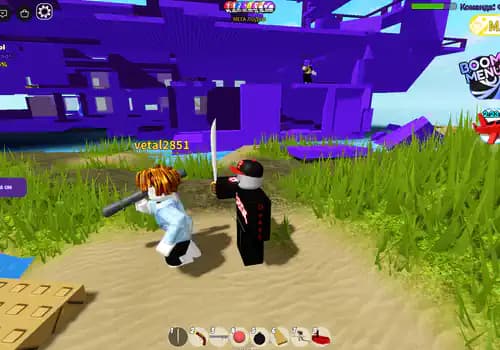
Как это работает: вы берёте мечь и нажимаете на кнопку ваш персонаж начинает перемещатся к тругим игрокам вам достаточно нажимать на удар мечом чтобы их убивать
Pilfering PiratesExplore more Pilfering PiratesDescription
Этот скрипт сделала ИИ не ждите чегото лучшего я проверил его 2 играх и он работает отлично
ВНИМАНИЕ: скрипт будет работать только в класичиских играх где обычные мечи но этот скрипт не как не будет работат в соперниках или в мм2!!!
В скрипте есть потсказки там есть настройки и тд, --- настройке надо делать до запуска!!
скрипт работает не только в игре которую я оставил в медия, игры с которыми будет работать скрипт должны быть похожи на::
Features
Avto kill
--=============================================================
--  TELEPORT-BEHIND + AUTO CLICKER
--  Кнопка-переключатель, перетаскивается по экрану
--=============================================================

local UserInputService = game:GetService("UserInputService")
local RunService = game:GetService("RunService")
local Players = game:GetService("Players")
local CoreGui = game:GetService("CoreGui")
local TweenService = game:GetService("TweenService")
local VirtualUser = game:GetService("VirtualUser")

local player = Players.LocalPlayer
local mouse = player:GetMouse()

--=============================================================
--  НАСТРОЙКИ
--=============================================================
local CONFIG = {
    TeleportDistance = 3,      -- на сколько студов сзади вставать
    TeleportHeight   = 0,      -- смещение по высоте (0 = как у цели)
    TPInterval       = 0.05,   -- как часто телепортироваться (сек)
    ClickInterval    = 0.05,   -- как часто кликать (сек)
}

--=============================================================
--  ЗАЩИТА ОТ ДУБЛИРОВАНИЯ
--=============================================================
if CoreGui:FindFirstChild("TPBehindButton") then
    CoreGui.TPBehindButton:Destroy()
end

--=============================================================
--  СОЗДАНИЕ КНОПКИ
--=============================================================
local ScreenGui = Instance.new("ScreenGui")
ScreenGui.Name = "TPBehindButton"
ScreenGui.ResetOnSpawn = false
ScreenGui.ZIndexBehavior = Enum.ZIndexBehavior.Sibling
ScreenGui.Parent = CoreGui

local Button = Instance.new("TextButton")
Button.Name = "MainButton"
Button.Size = UDim2.new(0, 180, 0, 50)
Button.Position = UDim2.new(0, 20, 0.5, -25)
Button.BackgroundColor3 = Color3.fromRGB(25, 25, 32)
Button.Text = "🎯 TP Behind: OFF"
Button.TextColor3 = Color3.fromRGB(235, 235, 245)
Button.Font = Enum.Font.GothamBold
Button.TextSize = 14
Button.AutoButtonColor = false
Button.Active = true
Button.Draggable = true   -- перетаскивание мышкой
Button.Parent = ScreenGui

local BtnCorner = Instance.new("UICorner")
BtnCorner.CornerRadius = UDim.new(0, 12)
BtnCorner.Parent = Button

local BtnStroke = Instance.new("UIStroke")
BtnStroke.Color = Color3.fromRGB(60, 60, 75)
BtnStroke.Thickness = 1
BtnStroke.Parent = Button

--=============================================================
--  ЛОГИКА ВЫБОРА ЦЕЛИ
--=============================================================
local function GetTargetPlayer()
    local myTeam = player.Team
    local closest, closestDist = nil, math.huge

    for _, other in ipairs(Players:GetPlayers()) do
        if other == player then continue end
        if not other.Character then continue end

        local hrp = other.Character:FindFirstChild("HumanoidRootPart")
        local hum = other.Character:FindFirstChildOfClass("Humanoid")
        if not hrp or not hum or hum.Health <= 0 then continue end

        -- Проверка команды (если команды есть в игре)
        if myTeam and other.Team == myTeam then
            continue -- пропускаем союзников
        end

        -- Ищем ближайшего
        local myHrp = player.Character and player.Character:FindFirstChild("HumanoidRootPart")
        if not myHrp then continue end

        local dist = (hrp.Position - myHrp.Position).Magnitude
        if dist < closestDist then
            closestDist = dist
            closest = other
        end
    end

    return closest
end

--=============================================================
--  СОСТОЯНИЕ
--=============================================================
local isActive = false
local lastTp = 0
local lastClick = 0

--=============================================================
--  ГЛАВНЫЙ ЦИКЛ
--=============================================================
RunService.Heartbeat:Connect(function()
    if not isActive then return end

    local now = tick()

    -- ───── АВТО-ТЕЛЕПОРТ ЗА СПИНУ ─────
    if now - lastTp >= CONFIG.TPInterval then
        lastTp = now

        local target = GetTargetPlayer()
        if target and target.Character then
            local targetHrp = target.Character:FindFirstChild("HumanoidRootPart")
            local myChar = player.Character
            local myHrp = myChar and myChar:FindFirstChild("HumanoidRootPart")

            if targetHrp and myHrp then
                -- Позиция сзади цели
                local behindPos = targetHrp.CFrame * CFrame.new(0, CONFIG.TeleportHeight, CONFIG.TeleportDistance)
                -- Поворачиваемся лицом к цели
                local lookAt = CFrame.lookAt(behindPos.Position, targetHrp.Position)
                myHrp.CFrame = lookAt
            end
        end
    end

    -- ───── АВТО-КЛИКЕР ─────
    if now - lastClick >= CONFIG.ClickInterval then
        lastClick = now

        -- Клик по центру экрана через VirtualUser
        VirtualUser:Button1Down(Vector2.new(0, 0), workspace.CurrentCamera.CFrame)
        VirtualUser:Button1Up(Vector2.new(0, 0), workspace.CurrentCamera.CFrame)
    end
end)

--=============================================================
--  ПЕРЕКЛЮЧАТЕЛЬ
--=============================================================
Button.MouseButton1Click:Connect(function()
    isActive = not isActive

    if isActive then
        Button.Text = "🎯 TP Behind: ON"
        Button.BackgroundColor3 = Color3.fromRGB(80, 40, 140)
        TweenService:Create(BtnStroke, TweenInfo.new(0.2), {Color = Color3.fromRGB(140, 90, 255)}):Play()
    else
        Button.Text = "🎯 TP Behind: OFF"
        Button.BackgroundColor3 = Color3.fromRGB(25, 25, 32)
        TweenService:Create(BtnStroke, TweenInfo.new(0.2), {Color = Color3.fromRGB(60, 60, 75)}):Play()
    end
end)

Button.MouseEnter:Connect(function()
    if not isActive then
        TweenService:Create(Button, TweenInfo.new(0.15), {BackgroundColor3 = Color3.fromRGB(40, 40, 52)}):Play()
    end
end)
Button.MouseLeave:Connect(function()
    if not isActive then
        TweenService:Create(Button, TweenInfo.new(0.15), {BackgroundColor3 = Color3.fromRGB(25, 25, 32)}):Play()
    end
end)

print("[TP Behind] Скрипт загружен. Кнопку можно перетаскивать.")Browse more Pilfering Pirates
No more scripts were found in this category, so here are the most popular scripts on RobxScript.
Browse the latest
Recently published Roblox scripts from across RobxScript.
![Fucker | Bug Evolution [🕷️]](/_next/image?url=%2Fmedia%2Fsubmissions%2F2026%2F10%2Fb1731b81-3a5c-4a35-8a6d-1a32819877a7.webp&w=828&q=75)

Comments
Questions, setup notes and feedback from signed-in RobxScript users.