
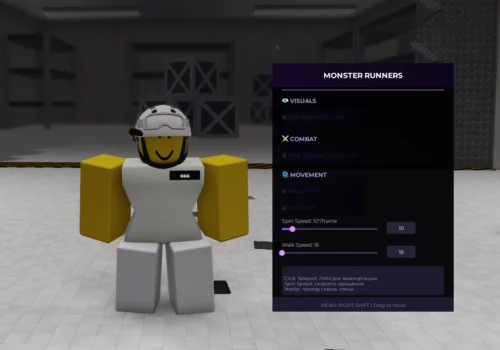
Monster Runners Script - Noclip, Teleports
New Monster Runners script with features like OP Features. Updated, working and free to use.
 Roblox ScriptsExplore more Roblox Scripts
Description
New Monster Runners script with features like OP Features. Updated, working and free to use.
Features
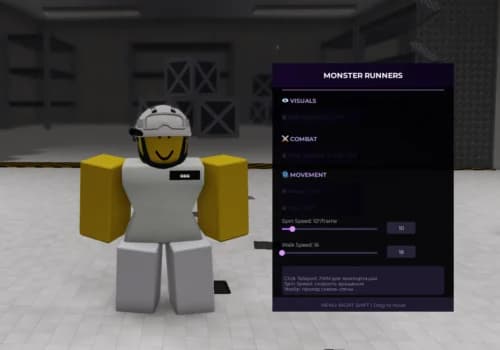
This Monster Runners utility script is designed to provide movement enhancements and gameplay assistance features. The GUI allows players to highlight important objects, teleport with mouse clicks, move through walls, spin their character, and customize movement speed. With simple toggles and adjustable sliders, the script focuses on improving navigation and mobility throughout the game.
✨ IMPORTANT — PLEASE READ
ESP (Highlight) – Highlight important players or objects
Visual Assistance – Improve target visibility
Click Teleport (LMB) – Teleport to selected locations with a mouse click
-- MONSTER RUNNERS ULTIMATE SCRIPT
-- Functions: ESP, Click Teleport, Speed, Spin with Speed Control, Noclip
-- Open Menu: RIGHT SHIFT

local Players = game:GetService("Players")
local RunService = game:GetService("RunService")
local UserInput = game:GetService("UserInputService")
local lp = Players.LocalPlayer
local camera = workspace.CurrentCamera
local mouse = lp:GetMouse()

-- ========================== SETTINGS ==========================
local settings = {
    espEnabled = false,
    clickTp = false,
    vaultSpeed = 16,
    spin = false,
    spinSpeed = 10,
    noclip = false
}

-- ========================== ESP SYSTEM (HIGHLIGHT) ==========================
local highlights = {}

local function updateESP()
    for _, plr in pairs(Players:GetPlayers()) do
        if plr ~= lp and settings.espEnabled then
            if not highlights[plr] and plr.Character then
                local highlight = Instance.new("Highlight")
                highlight.Name = "ESP_Highlight"
                highlight.FillTransparency = 0.6
                highlight.OutlineTransparency = 0.2
                highlight.OutlineColor = Color3.fromRGB(255, 0, 0)
                highlight.FillColor = Color3.fromRGB(255, 0, 0)
                highlight.Parent = plr.Character
                highlights[plr] = highlight
            end
        elseif highlights[plr] then
            highlights[plr]:Destroy()
            highlights[plr] = nil
        end
    end
end

local function onCharacterAdded(plr, char)
    if not settings.espEnabled or plr == lp then return end
    task.wait(0.5)
    if not char.Parent then return end

    local highlight = Instance.new("Highlight")
    highlight.Name = "ESP_Highlight"
    highlight.FillTransparency = 0.6
    highlight.OutlineTransparency = 0.2
    highlight.OutlineColor = Color3.fromRGB(255, 0, 0)
    highlight.FillColor = Color3.fromRGB(255, 0, 0)
    highlight.Parent = char
    highlights[plr] = highlight
end

for _, plr in pairs(Players:GetPlayers()) do
    if plr ~= lp then
        plr.CharacterAdded:Connect(function(char)
            onCharacterAdded(plr, char)
        end)
        if plr.Character then
            onCharacterAdded(plr, plr.Character)
        end
    end
end

Players.PlayerAdded:Connect(function(plr)
    if plr ~= lp then
        plr.CharacterAdded:Connect(function(char)
            onCharacterAdded(plr, char)
        end)
    end
end)

-- ========================== CLICK TELEPORT ==========================
local function getGroundPosition(mousePos)
    local raycastParams = RaycastParams.new()
    raycastParams.FilterType = Enum.RaycastFilterType.Blacklist
    raycastParams.FilterDescendantsInstances = {lp.Character}

    local rayOrigin = mousePos + Vector3.new(0, 10, 0)
    local rayDirection = Vector3.new(0, -50, 0)

    local rayResult = workspace:Raycast(rayOrigin, rayDirection, raycastParams)

    if rayResult and rayResult.Position then
        return rayResult.Position + Vector3.new(0, 2, 0)
    end
    return nil
end

local function handleClickTp()
    if not settings.clickTp then return end

    local char = lp.Character
    if not char then return end

    local hrp = char:FindFirstChild("HumanoidRootPart")
    if not hrp then return end

    local target = mouse.Target
    if target and target:IsA("BasePart") then
        local targetPos = target.Position

        local groundPos = getGroundPosition(targetPos)

        if groundPos then
            hrp.CFrame = CFrame.new(groundPos)
        else
            local validX = math.clamp(targetPos.X, -800, 800)
            local validZ = math.clamp(targetPos.Z, -800, 800)
            local validY = math.clamp(targetPos.Y, 5, 500)
            hrp.CFrame = CFrame.new(validX, validY, validZ)
        end

        task.wait(0.05)

        local humanoid = char:FindFirstChild("Humanoid")
        if humanoid and humanoid:GetState() == Enum.HumanoidStateType.Freefall then
            local spawn = workspace:FindFirstChild("SpawnLocation")
            if spawn then
                hrp.CFrame = spawn.CFrame + Vector3.new(0, 3, 0)
            end
        end
    end
end

-- ========================== SPIN WITH SPEED CONTROL ==========================
local spinConnection = nil

local function startSpin()
    if spinConnection then return end

    spinConnection = RunService.RenderStepped:Connect(function()
        if settings.spin then
            local char = lp.Character
            if char then
                local hrp = char:FindFirstChild("HumanoidRootPart")
                if hrp then
                    hrp.CFrame = hrp.CFrame * CFrame.Angles(0, math.rad(settings.spinSpeed), 0)
                end
            end
        end
    end)
end

local function stopSpin()
    if spinConnection then
        spinConnection:Disconnect()
        spinConnection = nil
    end
end

-- ========================== NOCLIP ==========================
local function handleNoclip()
    if not settings.noclip then return end

    local char = lp.Character
    if not char then return end

    for _, v in pairs(char:GetDescendants()) do
        if v:IsA("BasePart") then
            v.CanCollide = false
        end
    end
end

-- ========================== SPEED ==========================
local function setSpeed()
    local char = lp.Character
    if not char then return end

    local humanoid = char:FindFirstChild("Humanoid")
    if humanoid then
        humanoid.WalkSpeed = settings.vaultSpeed
    end
end

-- ========================== MAIN LOOP ==========================
RunService.Heartbeat:Connect(function()
    pcall(function()
        updateESP()
        setSpeed()
        handleNoclip()

        if settings.spin then
            if not spinConnection then
                startSpin()
            end
        else
            if spinConnection then
                stopSpin()
            end
        end
    end)
end)

-- Click Teleport (LMB)
mouse.Button1Down:Connect(function()
    if settings.clickTp then
        pcall(handleClickTp)
    end
end)

-- Respawn handler
lp.CharacterAdded:Connect(function(char)
    task.wait(0.5)
    setSpeed()

    if settings.spin then
        stopSpin()
        startSpin()
    end
end)

-- ========================== BEAUTIFUL MENU ==========================
local menuGui = Instance.new("ScreenGui")
menuGui.Name = "MonsterRunnersMenu"
menuGui.Parent = game:GetService("CoreGui")
menuGui.IgnoreGuiInset = true

local mainFrame = Instance.new("Frame")
mainFrame.Size = UDim2.new(0, 380, 0, 520)
mainFrame.Position = UDim2.new(0.5, -190, 0.5, -260)
mainFrame.BackgroundColor3 = Color3.fromRGB(15, 15, 25)
mainFrame.BackgroundTransparency = 0.05
mainFrame.BorderSizePixel = 0
mainFrame.ClipsDescendants = true
mainFrame.Active = true
mainFrame.Draggable = true
mainFrame.Visible = false
mainFrame.Parent = menuGui

local gradient = Instance.new("UIGradient")
gradient.Color = ColorSequence.new{
    ColorSequenceKeypoint.new(0, Color3.fromRGB(40, 20, 50)),
    ColorSequenceKeypoint.new(1, Color3.fromRGB(15, 15, 30))
}
gradient.Parent = mainFrame

local titleFrame = Instance.new("Frame")
titleFrame.Size = UDim2.new(1, 0, 0, 50)
titleFrame.BackgroundColor3 = Color3.fromRGB(50, 30, 70)
titleFrame.BorderSizePixel = 0
titleFrame.Parent = mainFrame

local titleGradient = Instance.new("UIGradient")
titleGradient.Color = ColorSequence.new{
    ColorSequenceKeypoint.new(0, Color3.fromRGB(100, 50, 140)),
    ColorSequenceKeypoint.new(1, Color3.fromRGB(60, 30, 90))
}
titleGradient.Parent = titleFrame

local title = Instance.new("TextLabel")
title.Size = UDim2.new(1, 0, 1, 0)
title.Text = "MONSTER RUNNERS"
title.TextColor3 = Color3.fromRGB(255, 255, 255)
title.BackgroundTransparency = 1
title.Font = Enum.Font.GothamBold
title.TextSize = 18
title.Parent = titleFrame

local line = Instance.new("Frame")
line.Size = UDim2.new(1, -40, 0, 2)
line.Position = UDim2.new(0, 20, 0, 55)
line.BackgroundColor3 = Color3.fromRGB(120, 80, 160)
line.BorderSizePixel = 0
line.Parent = mainFrame

local function createSection(text, yPos)
    local section = Instance.new("TextLabel")
    section.Size = UDim2.new(1, -40, 0, 25)
    section.Position = UDim2.new(0, 20, 0, yPos)
    section.Text = text
    section.TextColor3 = Color3.fromRGB(180, 150, 220)
    section.BackgroundTransparency = 1
    section.Font = Enum.Font.GothamBold
    section.TextSize = 14
    section.TextXAlignment = Enum.TextXAlignment.Left
    section.Parent = mainFrame
    return section
end

local function createToggle(text, setting, yPos)
    local btn = Instance.new("TextButton")
    btn.Size = UDim2.new(0, 170, 0, 35)
    btn.Position = UDim2.new(0, 20, 0, yPos)
    btn.Text = "◉ " .. text .. "  OFF"
    btn.TextColor3 = Color3.fromRGB(220, 220, 220)
    btn.BackgroundColor3 = Color3.fromRGB(35, 30, 50)
    btn.BorderSizePixel = 0
    btn.Font = Enum.Font.Gotham
    btn.TextSize = 13
    btn.TextXAlignment = Enum.TextXAlignment.Left

    local btnGradient = Instance.new("UIGradient")
    btnGradient.Color = ColorSequence.new{
        ColorSequenceKeypoint.new(0, Color3.fromRGB(55, 40, 75)),
        ColorSequenceKeypoint.new(1, Color3.fromRGB(35, 30, 50))
    }
    btnGradient.Parent = btn

    local corner = Instance.new("UICorner")
    corner.CornerRadius = UDim.new(0, 6)
    corner.Parent = btn

    btn.Parent = mainFrame

    btn.MouseButton1Click:Connect(function()
        settings[setting] = not settings[setting]
        local state = settings[setting] and "ON" or "OFF"
        local icon = settings[setting] and "●" or "◉"
        btn.Text = icon .. " " .. text .. "  " .. state
        btn.TextColor3 = settings[setting] and Color3.fromRGB(100, 255, 100) or Color3.fromRGB(220, 220, 220)
        btn.BackgroundColor3 = settings[setting] and Color3.fromRGB(60, 50, 90) or Color3.fromRGB(35, 30, 50)

        if setting == "espEnabled" then
            if not settings.espEnabled then
                for _, v in pairs(highlights) do
                    pcall(function() v:Destroy() end)
                end
                highlights = {}
            else
                for _, plr in pairs(Players:GetPlayers()) do
                    if plr ~= lp and plr.Character then
                        onCharacterAdded(plr, plr.Character)
                    end
                end
            end
        end

        if setting == "spin" then
            if settings.spin then
                startSpin()
            else
                stopSpin()
            end
        end
    end)

    return btn
end

local function createSlider(text, setting, minVal, maxVal, yPos, format, suffix)
    local sliderFrame = Instance.new("Frame")
    sliderFrame.Size = UDim2.new(0, 340, 0, 50)
    sliderFrame.Position = UDim2.new(0, 20, 0, yPos)
    sliderFrame.BackgroundTransparency = 1
    sliderFrame.Parent = mainFrame

    local label = Instance.new("TextLabel")
    label.Size = UDim2.new(0, 200, 0, 20)
    label.Position = UDim2.new(0, 0, 0, 0)
    label.Text = text .. ": " .. settings[setting] .. (suffix or "")
    label.TextColor3 = Color3.fromRGB(200, 200, 200)
    label.BackgroundTransparency = 1
    label.Font = Enum.Font.Gotham
    label.TextSize = 12
    label.TextXAlignment = Enum.TextXAlignment.Left
    label.Parent = sliderFrame

    local sliderBar = Instance.new("Frame")
    sliderBar.Size = UDim2.new(0, 200, 0, 4)
    sliderBar.Position = UDim2.new(0, 0, 0, 25)
    sliderBar.BackgroundColor3 = Color3.fromRGB(60, 50, 80)
    sliderBar.BorderSizePixel = 0
    sliderBar.Parent = sliderFrame

    local fill = Instance.new("Frame")
    fill.Size = UDim2.new((settings[setting] - minVal) / (maxVal - minVal), 0, 1, 0)
    fill.BackgroundColor3 = Color3.fromRGB(160, 100, 220)
    fill.BorderSizePixel = 0
    fill.Parent = sliderBar

    local sliderBtn = Instance.new("TextButton")
    sliderBtn.Size = UDim2.new(0, 12, 0, 12)
    sliderBtn.Position = UDim2.new((settings[setting] - minVal) / (maxVal - minVal), -6, 0, -4)
    sliderBtn.BackgroundColor3 = Color3.fromRGB(220, 150, 255)
    sliderBtn.BorderSizePixel = 0
    sliderBtn.Text = ""
    sliderBtn.Parent = sliderBar

    local corner = Instance.new("UICorner")
    corner.CornerRadius = UDim.new(1, 0)
    corner.Parent = sliderBtn

    local valueBox = Instance.new("TextBox")
    valueBox.Size = UDim2.new(0, 60, 0, 25)
    valueBox.Position = UDim2.new(0, 220, 0, 12)
    valueBox.Text = settings[setting]
    valueBox.TextColor3 = Color3.fromRGB(255, 255, 255)
    valueBox.BackgroundColor3 = Color3.fromRGB(40, 35, 55)
    valueBox.BorderSizePixel = 0
    valueBox.Font = Enum.Font.Gotham
    valueBox.TextSize = 12
    valueBox.Parent = sliderFrame

    local btnCorner = Instance.new("UICorner")
    btnCorner.CornerRadius = UDim.new(0, 4)
    btnCorner.Parent = valueBox

    local dragging = false
    sliderBtn.MouseButton1Down:Connect(function()
        dragging = true
    end)

    UserInput.InputEnded:Connect(function(input)
        if input.UserInputType == Enum.UserInputType.MouseButton1 then
            dragging = false
        end
    end)

    UserInput.InputChanged:Connect(function(input)
        if dragging and input.UserInputType == Enum.UserInputType.MouseMovement then
            local mousePos = UserInput:GetMouseLocation()
            local barPos = sliderBar.AbsolutePosition
            local barSize = sliderBar.AbsoluteSize.X
            local percent = math.clamp((mousePos.X - barPos.X) / barSize, 0, 1)
            local value = minVal + percent * (maxVal - minVal)
            if format == "int" then
                value = math.floor(value)
            end
            value = math.clamp(value, minVal, maxVal)
            settings[setting] = value
            fill.Size = UDim2.new(percent, 0, 1, 0)
            sliderBtn.Position = UDim2.new(percent, -6, 0, -4)
            label.Text = text .. ": " .. value .. (suffix or "")
            valueBox.Text = value
        end
    end)

    valueBox.FocusLost:Connect(function()
        local val = tonumber(valueBox.Text)
        if val then
            val = math.clamp(val, minVal, maxVal)
            settings[setting] = val
            local percent = (val - minVal) / (maxVal - minVal)
            fill.Size = UDim2.new(percent, 0, 1, 0)
            sliderBtn.Position = UDim2.new(percent, -6, 0, -4)
            label.Text = text .. ": " .. val .. (suffix or "")
            valueBox.Text = val
        else
            valueBox.Text = settings[setting]
        end
    end)

    return sliderFrame
end

-- СОЗДАНИЕ МЕНЮ
createSection("👁️ VISUALS", 65)
createToggle("ESP (Highlight)", "espEnabled", 95)

createSection("⚔️ COMBAT", 145)
createToggle("Click Teleport (LMB)", "clickTp", 175)

createSection("🌀 MOVEMENT", 220)
createToggle("Noclip", "noclip", 250)
createToggle("Spin", "spin", 285)
createSlider("Spin Speed", "spinSpeed", 5, 50, 320, "int", "°/frame")
createSlider("Walk Speed", "vaultSpeed", 16, 120, 370, "int", "")

local infoFrame = Instance.new("Frame")
infoFrame.Size = UDim2.new(1, -40, 0, 60)
infoFrame.Position = UDim2.new(0, 20, 0, 425)
infoFrame.BackgroundColor3 = Color3.fromRGB(30, 25, 45)
infoFrame.BorderSizePixel = 0
infoFrame.Parent = mainFrame

local infoCorner = Instance.new("UICorner")
infoCorner.CornerRadius = UDim.new(0, 6)
infoCorner.Parent = infoFrame

local infoText = Instance.new("TextLabel")
infoText.Size = UDim2.new(1, -10, 1, 0)
infoText.Position = UDim2.new(0, 5, 0, 5)
infoText.Text = "Click Teleport: ЛКМ для телепортации\nSpin Speed: скорость вращения\nNoclip: проход сквозь стены"
infoText.TextColor3 = Color3.fromRGB(180, 160, 200)
infoText.BackgroundTransparency = 1
infoText.Font = Enum.Font.Gotham
infoText.TextSize = 11
infoText.TextXAlignment = Enum.TextXAlignment.Left
infoText.Parent = infoFrame

local statusBar = Instance.new("Frame")
statusBar.Size = UDim2.new(1, 0, 0, 30)
statusBar.Position = UDim2.new(0, 0, 1, -30)
statusBar.BackgroundColor3 = Color3.fromRGB(30, 25, 45)
statusBar.BorderSizePixel = 0
statusBar.Parent = mainFrame

local statusText = Instance.new("TextLabel")
statusText.Size = UDim2.new(1, 0, 1, 0)
statusText.Text = "MENU: RIGHT SHIFT | Drag to move"
statusText.TextColor3 = Color3.fromRGB(150, 130, 180)
statusText.BackgroundTransparency = 1
statusText.Font = Enum.Font.Gotham
statusText.TextSize = 11
statusText.Parent = statusBar

UserInput.InputBegan:Connect(function(input)
    if input.KeyCode == Enum.KeyCode.RightShift then
        mainFrame.Visible = not mainFrame.Visible
    end
end)

print("=" .. string.rep("=", 50))
print("MONSTER RUNNERS ULTIMATE SCRIPT LOADED")
print("Features: ESP, Click Teleport, Noclip, Spin, Speed")
print("Open menu: RIGHT SHIFT")
print("=" .. string.rep("=", 50))Browse more Roblox Scripts
Popular scripts from Roblox Scripts.
Browse the latest
Recently published Roblox scripts from across RobxScript.
![[OP] KILL ALL, TRIGGER BOT, ESP, AIMBOT, SPEED HACKS](/_next/image?url=%2Fmedia%2Fsubmissions%2F2026%2F09%2F1c767f62-b07f-4822-8add-554f66867852.webp&w=828&q=75)
![[FREE] Advanced Auto Farm, Teleports, Script Hub](/_next/image?url=%2Fmedia%2Fsubmissions%2F2026%2F09%2F0df1dc39-c828-4664-b47b-257ff3292be0.webp&w=828&q=75)
Comments
Questions, setup notes and feedback from signed-in RobxScript users.