
BloxStrike Script Pulse Hub - ESP, Aim, Gun Settings
Explore Pulse Hub for BloxStrike with ESP, aim settings, weapon-specific Legit and Silent profiles.
 [NEW MAP] BloxStrikeExplore more [NEW MAP] BloxStrike
Description
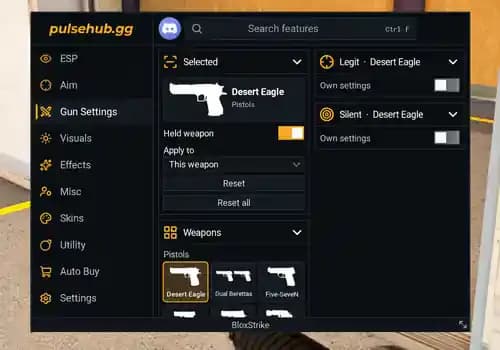
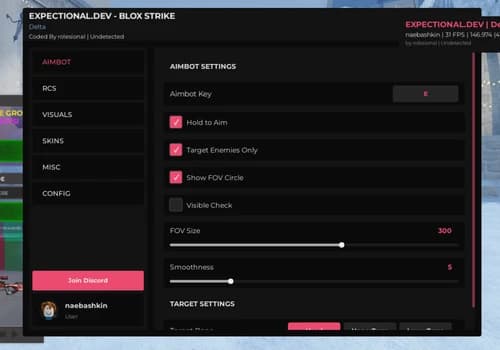
Pulse Hub for BloxStrike organizes aiming options, weapon settings and visual customization into a dark interface with dedicated navigation tabs. The sidebar includes ESP, Aim, Gun Settings, Visuals, Effects, Misc, Skins, Utility, Auto Buy and Settings.
The Gun Settings tab provides a weapon selection panel alongside separate Legit and Silent configuration sections. Each section includes an Own settings toggle for the selected weapon, allowing weapon-specific configuration through the interface.
Features
Pulse Hub combines ESP, aiming options and weapon-specific configuration for BloxStrike. Its Gun Settings section lets you select a weapon and access separate Legit and Silent settings, each with an Own settings toggle.
The weapon browser includes options such as Desert Eagle, Dual Berettas and Five-SeveN. An Apply to selector and separate Reset controls help manage configurations, while the feature search provides quick access to settings across the hub.
Additional tabs include Visuals, Effects, Skins, Auto Buy, Misc and Utility.
ESP Section — Dedicated tab for accessing ESP settings.
Aim Section — Separate navigation tab for aiming options.
Gun Settings — Central panel for selecting weapons and managing their configuration.
Legit Settings — Weapon-specific Legit panel with an Own settings toggle.
loadstring(game:HttpGet("https://raw.githubusercontent.com/PulseZax/Loader/refs/heads/main/.lua"))()Related Scripts
Browse more [NEW MAP] BloxStrike
Popular scripts from [NEW MAP] BloxStrike.
Browse the latest
Recently published Roblox scripts from across RobxScript.

![Fucker | Bug Evolution [🕷️]](/_next/image?url=%2Fmedia%2Fsubmissions%2F2026%2F10%2Fb1731b81-3a5c-4a35-8a6d-1a32819877a7.webp&w=828&q=75)

Comments
Questions, setup notes and feedback from signed-in RobxScript users.